Tablet at the entrance or PC as the terminal
The terminal is a web page. A tablet or a PC at reception is paired with a six-digit code, after which everyone clocks in with their name and their own PIN.
Office time tracking without an Excel list: a tablet stands at the entrance, or a PC is paired as the terminal. Everyone clocks in with their name and PIN, and management sees time accounts, leave and notes on the German Working Hours Act (Arbeitszeitgesetz).
All about the time tracking: features, devices and reports at a glance
Following the decision of the Federal Labour Court (Bundesarbeitsgericht) of 13.09.2022 (1 ABR 22/21), employers must record their employees' working time systematically. The decision makes no exception for law firms, tax advisers or agencies. For mini-jobs, § 17 of the German Minimum Wage Act (Mindestlohngesetz) also expressly requires the start, end and duration of daily working time to be recorded. gotakt Zeit records every clocked time to the minute and shows management a note after the shift if breaks were too short, more than 10 hours were worked or there were fewer than 11 hours of rest between two working days.
The terminal is a web page. A tablet or a PC at reception is paired with a six-digit code, after which everyone clocks in with their name and their own PIN.
Weekly hours per person, actual against target calculated automatically. Leave, sickness and public holidays reduce the target, days before the start date do not count.
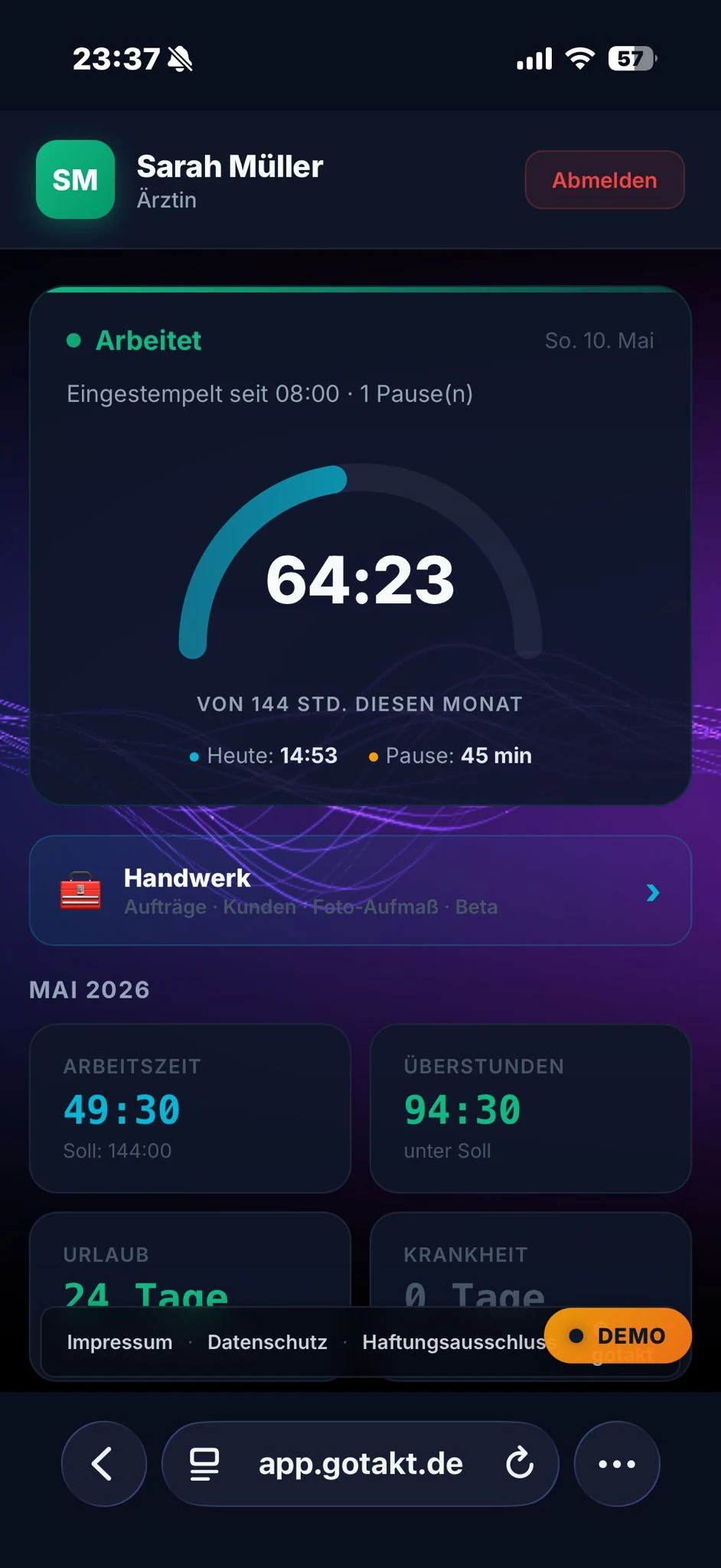
Everyone sees their hours, time account and remaining leave in the phone browser and requests leave there. Management approves under “Requests”, and the calendar shows overlaps.
Breaks that are too short, more than 10 hours or too little rest appear after the shift under “Needs attention”. In the CSV export they are in the Remarks column.
You invite a partner, office manager or HR lead with a management code. All management logins have the same full rights.
CSV with the origin of every time entry and a timesheet per person with signature lines. The export for DATEV Lodas (payroll software widely used by German tax advisers) is in trial and clearly marked as beta.
A real screenshot, not a rendering. Your employees see their hours and their time account and request leave on their own smartphone. It runs in the browser, no app store needed. Clocking in happens on the tablet.
Legal information has been compiled to the best of our knowledge and does not replace legal advice.
Yes. Since the decision of the Federal Labour Court of 13.09.2022 (1 ABR 22/21), employers must record their employees' working time systematically, regardless of the size of the office. Current law does not yet prescribe a particular form, such as electronic. An Excel list can meet the obligation if it is kept completely.
The Federal Labour Court's decision does not distinguish between working time models. Even with trust-based working hours, the start, end and duration of working time must be recorded. How freely your employees divide up their time remains a matter for your agreements.
No. gotakt Zeit records working time per person: arriving, breaks, leaving. There are no projects, clients, activities or cost centres, and billable hours cannot be analysed with it. For that you still need your practice management or project software.
In the browser, nobody can clock in from a phone or a laptop at home. Today, management adds home office days as a shift with a reason; the timesheet then shows “added afterwards”. An app in which management enables clocking in for individual people is in preparation and not yet in the App Store or on Google Play.
Yes. The terminal is a web page, and any device with a browser can be paired with a six-digit code that is valid for 15 minutes. The view is optimised for tablets. If a device is lost or replaced, you unpair it with one click.
There is a file for DATEV Lodas with personnel number, wage type, date and hours, one line per shift. It is marked as beta in the product, and a real import has not yet been tested. The CSV export and the timesheet per person are safe to use. There are no interfaces to payroll programs, only files.
For offices that want to bill project or client time, for teams that work mainly from home and are supposed to clock in themselves, and for companies with several locations in one account. Graded roles such as “read only” do not exist either. If your team comes into the office and you are looking for clean working time records with time account and leave, it fits.
€3 per person per month with a minimum price of €29. With 15 employees that is €45 a month, cancellable monthly, with no setup fee.
Write to us and we will get back to you within 24 hours with a ready setup proposal. Or try the demo yourself first.
Reply within 24 hours, no sales pressure.